There are a few different types of connectors used for this signal type. Even though the connectors look different the signal can be the same.
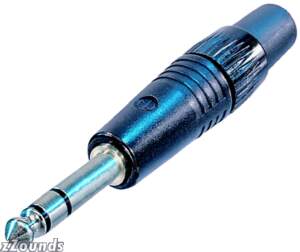 6.35mm - 1/4 inch: This connector is not commonly used by Home Theaters but you may see it along the way and wonder what it is. It is the largest type of Stereo Audio connector that you would see in the home environment. This connector is still used to hook up a guitar or certain microphones to a sound system.
 3.5mm - 1/8 inch: This is one of the more common cable types that you will see around the house. It is used by computers to send the sound to your speakers, almost all MP3 players "IPOD" and some cell phones. This connector is much smaller and was given the nickname Stereo Mini because of how much smaller it is compared to the much larger 1/4" version.
 2.5mm: This connector looks the same as a Stereo Mini but is about half the size if not smaller. This connector is used in a lot of cell phones to help make phones smaller. The signal going through this type of cable and connector is usually a bit different in most cases. Usually there is only one ear bud with a microphone attached to allow you to talk hands free. Some models give two ear buds with a microphone as well. This connector can vary a fair bit from one phone to the next so make sure you do some research on what type you have.
 RCA - Red & White: The two RCA "Red and Black" connectors are the most common type you will see in every home theater setup. The color code is always red and white and carries the Left and Right sound for stereo audio.
Adapters
 RCA to Stereo Mini If you wanted to hook a laptop / computer up to your TV for streaming a You Tube video, Movie or TV Show you will need one of these adapter cables 99% of the time. The output of your laptop will be a Stereo Mini and the input to your TV will be the Red and White RCA ports. Although on some LCD and Plasma TV's you may actually be lucky enough to have a Stereo Mini jack. Since the signal is the same the connector type does not matter which is why an adapter cable will always work..
 Stereo Mini to 1/4: There are hundreds of different adapters that you can use to accomplish what you are trying to do and this is just an example of one. You would use this type of connector if your receiver had a 1/4" headphone jack but you wanted to plug in standard IPOD "Stereo Mini" headphones. Once again the signal is the exact same so an adapter will work.
Digital Cables
 Digital Coax: This cable also uses the RCA type connector but the signal being sent over the cable are completely different. With a digital connection the amount of information that can be sent over a cable is far more then analog. This one cable will carry your full 5.1 to 7.1 surround sound from the device "DVD Player" to your receiver.
 Fiber optic: Fiber is able to send a signal much farther and faster then standard copper wire. There are two different types of fiber cables "Glass and Plastic." For residential purposes you will be using plastic fiber cables. Glass would be used outside the home to carry a signal for many miles. Be very careful with any type of fiber as it is very brittle and easily broken if stepped on or kinked in any way. You can test a fiber cable by shining a flashlight down one end of the cable and looking at the opposite end. I would recommend doing this when you first get the cable out of the packaging to get a good idea of how bright it should be. If the cable stops working and you try this test again the light will be significantly dimmer if the fiber is damaged at all.
General Audio / Video Cabling Tip
Video cables are not the same as audio cables. The cables and connectors can all look the same but they have different specifications for the two applications. You should never use a video cable for audio or an audio cable for video.


